Saturday, 9 September 2017

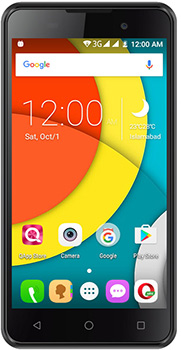
How To Root Qmobile X700 PRO ||

QMobile Noir X700 Pro II Price in Pakistan


Hello guys! few weeks ago i posted how to root your android devices in which i have mentioned several popular methods for android rooting but there are cases in which all those methods failed to root.Click here if want to read that post

Now Qmobile X700 pro 2 is one of those phones in which all the methods failed.I tried every thing to root this phone but its so persistent that at a point i thought its impossible to root it.

But than i discovered a methods that actually worked and i successfully rooted this phone

Before going any further please make sure you know every thing about rooting Click here to get a complete guide on Rooting

Requirments

  1. Qmobile X700 PRO ||
  2. 50 - 100 percent charged
  3. PC or laptop
  4. Internet connection
  5. WinRar for extraction
  6. SP Tool for flashing Download here
  7. Root package Download here

 Method

 So the method we will use is the modification of flashing   SuperSU.zip however in our case we will no use any SuperSU.zip 
 download the package and extract it copy the magisk.zip file to   the internal storage of your phone.


 install the SpTool flash and run the program by double clicking on   the flast_tool.exe


  make sure the scatter file you have selected is the same placed in the root package you just d       downloaded

 Than click on the download button and connect your phone to PC or laptop.Make sure that your   device drivers are installed in the laptop or PC and also install the PDA drivers.if you don't know   how to do it than give a quick search in google.

 If you installed the drivers correctly than a progress bar will appear and it will start flashing the custom recovery in your phone after that a green circle will appear.

 now boot your phone to recovery mod by pressing vol up + power button and select update from sd   card and than select the magisk.zip file and flash it. reboot your phone and you will have root access
also majisk app will be installed automatically don't uninstall it or you will lose root access

Video


Saturday, 12 August 2017

How to root any android device

How to root any android device


Before start reading how to root your android device first read what is root?
if you already know than you can proceed
Honestly speaking there is no absolute method for rooting android phones. As android phones varies largely not just on the basis of their software but also hardware so its very difficult to say which method will work for you but i am listing all the possible methods

Root any Android using Kingo Root:


Image result for kingo root

Kingo ROOT
is One – Click Root Designed to work on Windows Computer. It helps to root any Android Smartphones in single click which has a success rate of 80-90%. This is the best Android rooting software through PC available in the market. It’s only one click root app which has many developers working on it to bring improvements and to increase the device limit in every update which is frequently released.
you can also use Kingo Root PC version just install it and and connect your android device using USB cable make sure use device drivers are installed and updated than run the application in PC and and click on root it will start rooting your phone. It has has more chances of success than android version of the application


Root any Android using  iRoot:
Image result for iroot
iRoot App was previously known as vRoot. iRoot provides rooting for almost all Android devices with different Android versions. After the full preparation, you are able to root the Android devices in 3 handy steps: Install and launch iRoot -> Enable USB Debugging -> Begin “Root”. Continuous updates and improvements of root scripts ensure the success of your Android devices rooting rate, which makes iRoot powerful. You can try android and PC version of this application in order to download visit here
Above Methods Failed!

There is possibility that the above stated method failed in achieving the goal if so than relaying on third party software is not a very good idea as both of them are currently the best software in this scope.
So changing the method is the best option here.

Flashing:

The process i am going to discuss now are flashing based and are some how dangerous if you are desperate to root your android device than proceed

CF Auto Root:

If you are Samsung user than this method will definitely work for you if your device is supported Go to CF Auto Root page, Press Ctrl+F & type in your device name.Download the CF Auto Root file next to the device name. Now that you have CF Auto Root & odin downloaded. Turn off your Android device & boot into download mode.Launch Odin & check “Auto Reboot” & “F:Reset Time”. Click on PDA & locate the CF Auto Root downloaded file.


Flashing SuperSU zip:

For this method you must have a CWM or TWRP or Philz or any custom recovery installed on your device

next download latest recovery flashable SuperSU from here than place this file in root folder of your internal storage reboot your device to recovery mode and flash the zip file you just downloaded than reboot your device again and you will see the SuperSU app installed on your device with fully functioning root

Image result for cwm


Root :A Complete Guide

Android Rooting 


Most of you might be familiar with the word ROOT. Most of you might have a rooted phone and they don't even know. And some of you want to root your phone just for running a single or few application without even knowing that what you can really do with this rooted phone

With rooted android device you can do many things that you cannot do with unrooted android. However rooting comes with some risk for example it will void your warranty but believe me other than that there is no risk.

So 

What is Root ?
Root as the name indicates allow you to alter the system files of your device. Now you do not alter them your self occasionally this task is done by some third party apps that. Some apps need to change the system files for their functionality.


Example
For example if you want to change font style of your android device using a third party application than it will make some changes in you /System/font folder in your device although their are apps available that can do it without root. I was just tying to explain

Why root is feared by many?
Now every app that uses root have direct or indirect access to the directory where phone's firmware is installed than any changing made by the app will be permanent that's why there is possibility that 
you might end up bricking your phone.
see root itself is very useful thing and not harmful at all what make it harmful is lack of knowledge 

Example
Have you ever deleted C:\Windows\System32 in your computer just to free up some space. If YES than you already know the result. In case of  android you will experience the same situation. See in case of PC its not the file manager which was dangerous but in actual it was you lack of knowledge.

How can i access to these files manually?
In your life you will experience a situation in which you might wanted to change the system files for example if you want to play some old gameloft game on a newer device than it will not let you play the game and show a popup that "Your device does not support this version" or something like that
in such case you can change the device name in a file named build.prop located in system folder in your root directory for doing this you need a special file manager that has root support for example es file explorer etc.


How to Root Android phones
Rooting android device is not very difficult task click here to see how to root any android device

Tuesday, 28 February 2017

Gpa Calculator

Gpa Calculator

Introducing a perfect SGPA and CGPA calculator


now you can save your academic record in your phone no need for remembering credit hours or your grades having this in your phone you can calculate your CGPA and SGPA in moment

There are some applications available on play store to do the same task however most of them don't have any option to save the data most of the time you want to save all your academic record in an android app.

sometime you want to check your SGPA, CGPA by estimating your grades and if so you definitely want to check all the possibility.

How to use?
Run the application by pressing the icon on the app drawer 


Click on any of the semester you want to fill your data in it will ask you to enter amount of subjects you have in that semester. It will than create empty slots with entries for subject name, credit hour, and grade fill this now.


After filling the empty slots click on Calculate GPA, It will show a dialog showing your SGPA press got it! button now press back button on your smart phone and you can see updated list of semester and CGPA


In case you want to reset all the data than press reset button as shown below


In order to download the GPA calculator just click here

Friday, 3 February 2017

Numerical Analysis


Numerical Analysis

A tool for solving Numericals in your android phone


  If you are looking for an application for android to solve your numerical analysis problems offline in just few clicks than you are at right place.


Methods Present For Different Problems


Numerical Master (Numerical Analysis) is an android application that can solve any problem related to numerical analysis

For Finding Root in Specific Interval:-
  1. Bisection Method
  2. Newton Ralphson Method
  3. Regula Falsi Method
  4. Secant Method

Also to ODEs Solution:-
  1. Euler Method
  2. Tylod Method Second Order
  3. Runge Kutta Method Order 2 And 4
  4. Adam BashForth Method

Also to Polynomial Approximation:-
  1. Lagrange Interpolation of nth Degree Ploynomial
  2. Newton Divided Difference for nth Degree Ploynomial

Syntax For Writing Functions:-


This Software uses the same syntax as matlab and other famous mathematics software


  • +,-,/,* for plus , minus , divide , multiply
  • The application Follow Order Of Precedence


  • sin(x)
  • cos(x)
  • tan(x)
  • asin(x) for sine inverse
  • acos(x)
  • atan(X)
  • sqrt(x) for taking square root

  • x^2 mean x*x
  • e = 2.67.... it can be used as e^(x)-2*x etc
  • pi = 3.14... can be used as sqrt(sin(pi*x)) etc


Examples


Where -8.88178419700125E-16 means -8.88178419700125*10^(-16)

Failure

Please make sure you are writing valid function and also in valid format and parameter for example if you put a variable othter than the recommended one you will never get the required result.

  • eg:- if it is asked to write f(x) please write the function with x as a variable
  • f(t,y) means function in t and y
  • please make sure you are using the syntax correctly
  • Always remember this app fails at all those points where the function fails its self for example bisection method can not find root of x^2 in interval [-1,1] because condition f(a)*f(b)<0 fails here

For Download click here

watch video here

How To Root Qmobile X700 PRO ||

Hello guys! few weeks ago i posted how to root your android devices in which i have mentioned several popular methods for an...